You probably heard that we are running out of static IPv4 addresses. Actually, we ran out in 2011! IPv4 provided 4.3 billion IP addresses, which is not enough to give everyone their own IP address. IPv5 suffered the same fate–not enough IP addresses–so, enter IPv6, which uses 128-bit addressing compared with IPv4’s 32-bit addressing. Instead of 4.3 billion IP addresses, we now have approximately 3.4 x 10^38 IP addresses to choose from–that’s more than 10^28 IP addresses for each of us! BTW, that’s better than telephone numbers, which will eventually run out, too.
I wanted to see if I could upgrade the website that holds my genome, http://genome.startcodon.org, to IPv6. What prompted the whole thing was AWS’ announcement that they were going to start charging for IPv4 addresses beginning in February 2024. I thought it might be a good time to migrate to IPv6 and save a little money. (The charge per EC2 instance is $0.005/hour, or about $4 per month.)
TL;DR IPv6 is tricky; we are still not ready for it, and I am not saving any money.
The first place to start is with your computer. Use https://test-ipv6.com to see if you have a local IPv6 address. If not, you probably have to fix your router. I am using an Orbi RBR850, and the instructions to turn on IPv6 were straightforward.
After fixing my router to speak IPv6, I thought I could declare victory and move on. Alas, no. Two days later I was sitting in a hotel room attempting to access my now IPv6-enabled website, http://genome.startcodon.org. But I couldn’t, so I tried https://test-ipv6.com/ to see what was going on. Sure enough, the hotel was not providing IPv6 addresses! So, back to square one.
It turns out that you can migrate to IPv6 (and I did), but keeping both IPv4 and IPv6 addresses running on your website maximizes interoperability for those folks who have not yet made the transition to IPv6. I suspect that we’ll be using IPv4 in combination with IPv6 for a long time.
The checklist
Here’s a non-exhaustive list of some things to keep in mind when migrating to IPv6. Good luck!
Your local network must assign an IPv6 address to your computer, probably using DNS.
Your ISP must support IPv6 natively or support a translation mechanism between IPv4 and IPv6.
On AWS, your VPN, subnet, routing table, network interface, and security group must be enabled to support IPv6.
In 2014, I uploaded my WGS data to the cloud and made it publicly available. In a previous post, I explained why I moved my WGS data from DNAnexus to Amazon. In this post, I explain the final step: attaching the S3 bucket to a web server. The goal was to replace the ftp server with a web server and make it easier to download my whole genome sequence data.
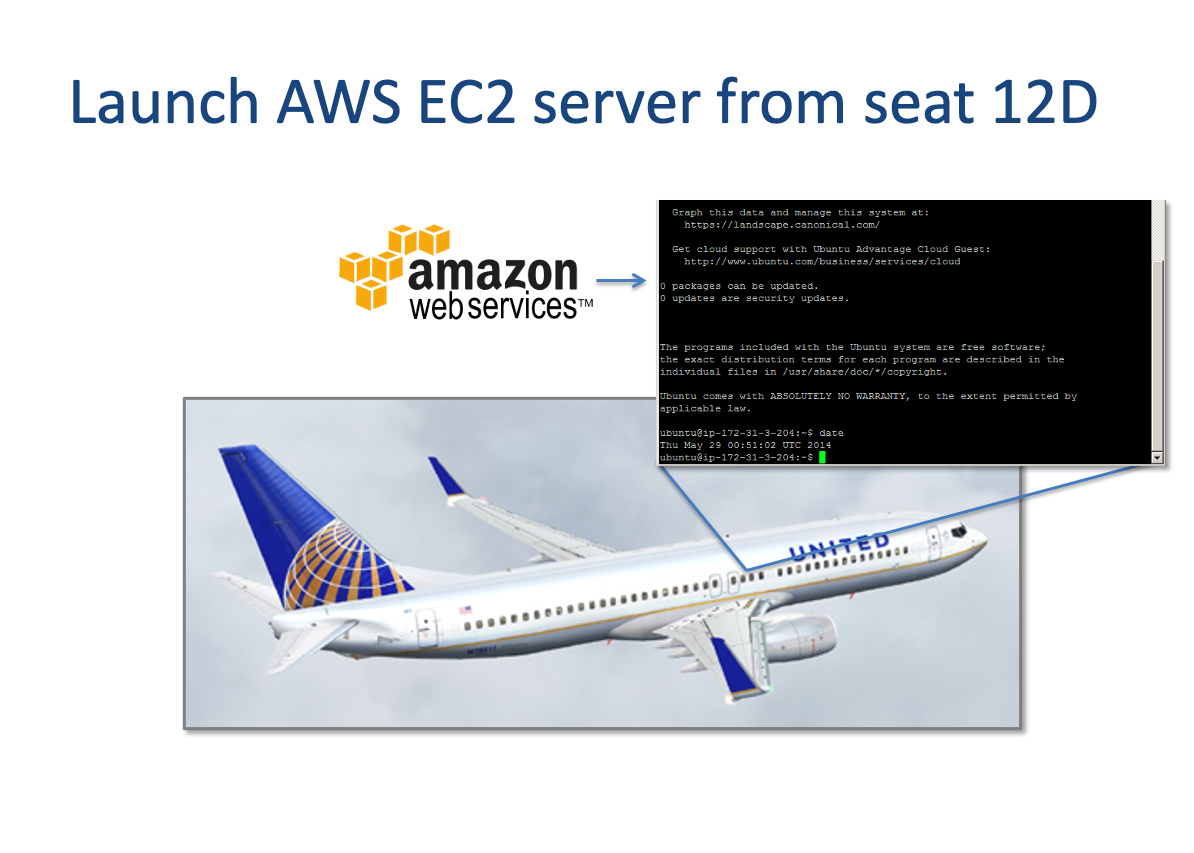
I launched my first cloud server literally while in the clouds in May 2014. Cloud computing has changed so much, it’s unbelievable. Back then, I had to patch the Linux kernel by hand so that the ftp server would work on AWS. Today, uploading your genome using Amazon’s command line interface (CLI) to an AWS S3 storage bucket is relatively easy. Understandably, Amazon makes it challenging (but doable) to make your storage publicly available. I used the Apache Web Server and s3fs to share this information.
My first cloud server
Step 1. Install Apache
Depending on your flavor of Linux, your commands may vary. I am using Ubuntu 18.04 LTS running on a t2.micro EC2 server. Here are the commands I used to install the Apache HTTP Server.
Step 2. Install s3fs
s3fs allows allows you to mount an S3 bucket via FUSE. s3fs preserves the native object format for files, allowing use of other tools like AWS CLI. Again, your commands may vary depending on your flavor of Linux. Here are the commands I used to install s3fs.
$1,500. That’s the amount of money I have spent over the past 5 years to store our family’s whole genome sequence (WGS) data. For $299 per person in 2020, I could sequence all of us again at 30x coverage, get the same data files, and spend less money. In 2015, I wrote about posting my WGS data to DNAnexus. Last month (July 2020), I moved all of our data to Amazon (AWS) S3 storage. In this post, I explain why.
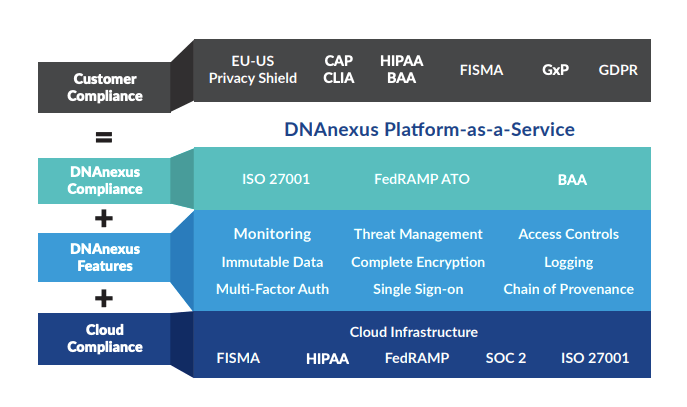
Five years ago, my impression was that DNAnexus was a platform for researchers, not consumers. It turns out that my first impression was correct–DNAnexus is not a platform for consumers. To their credit, their platform-as-a-service model includes an extensive set of genomic analysis tools, an easy-to-use SDK,top-notch documentation. a way to run your own docker images using Workflow Description Language (WDL), and a professional services team. DNAnexus’ IT infrastructure and regulatory compliance make the platform valuable for over 100 enterprise customers, and their recent $100M funding round coupled with their UK Biobank/AWS announcement will enable the company to expand into new markets and let researchers find more actionable insights.
DNAnexus Platform-as-a-Service
Nevertheless, I recently moved my WGS data to Amazon S3 due to storage costs and a lack of price transparency.
Storage costs
I’ve learned that most of the work that I want to do can be done with VCF files. Yes, there are times when I want to look at BAM files, but moving those files to lower-cost storage makes sense. DNAnexus introduced a Glacier-based archiving service in 2019 to support those operations, although I did not use it. My BAM file is 73 GBytes, which represents about 93% of the 79 GBytes for my WGS data (no FASTQ data). If I deeply archive BAM and FASTQ data (329 GBytes total), I can reduce the amount of higher-cost storage by 98%. The cost comparison for a single genome with FASTQ files looks roughly like this:
Storage cost on DNAnexus: (329 GBytes * $0.03 per GB-month [everything]) = $9.87 per month
Storage cost on AWS: (7 GBytes * $0.0125 per GB-month [VCF]) + (322 GBytes * $0.00099 per GB-month [everything else]) = $0.41 per month
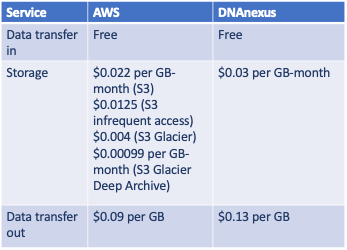
Overall, I can reduce my monthly storage costs by over 95% by using lower-cost storage tiers on AWS (see Table 1 below). Again, the comparison is apples-to-oranges because I did not use DNAnexus’ archiving service, mostly because it required a separate license to activate. Using Amazon S3, our monthly WGS storage costs will decrease from $24 per month to less than $1 per month.
Table 1. Comparison of AWS and DNAnexus storage pricing (accessed August 23, 2020).
Lack of price transparency
If we compare AWS’ S3 storage price from 5 years ago to DNAnexus’, we find that the storage markup was 35% over the S3 list price. It turns out that Amazon decreased its S3 storage price over the past 5 years, which led DNAnexus to drop their storage price to the current $0.03 per GB-month, still at a 35% markup. (For comparison, on demand GPU- or FPGA-based compute cycles (Amazon EC2) are marked-up over 100%.)
I do not fault DNAnexus for marking-up AWS pricing–they are a business and provide value beyond storage and compute cycles. However, you will not find any pricing information on the DNAnexus website. In addition to storage costs, add-ons like archiving and GxP regulatory compliance require separate licenses that are not disclosed when signing-up. Presumably, the company’s professional services team assists with these onboarding activities.
How to move your data from DNAnexus to AWS
So, having made the decision to move my WGS data to AWS, how did I do it?
On the DNAnexus platform, I used AWS S3 Exporter, a company-provided tool to upload data to an AWS S3 bucket (DNAnexus account required). You can invoke the exporter using either their SDK (dx-toolkit) or an online wizard–both methods work great. The DNAnexus policy documentation does not include verification by default, so I updated the AWS IAM policy file with a resource-based policy and also enabled transfers to work with verification:
Another improvement: You can transfer your data from one S3 instance to another (DNAnexus to AWS) at the rate of 250 GBytes per hour, including verification. Five years ago, the transfer speed was 10 GBytes per hour!
One final gotcha
One thing that has not changed in 5 years is the “data transfer out” fee. Amazon’s fee is $0.09 per GByte and DNAnexus’ fee is $0.13 per GByte. This fee is an understandable disincentive to keep you from moving your data around too much. In my case, moving our family’s WGS data to AWS will add over $100 to the final bill. It’s a little like losing all your money at baccarat and then finding out that you still owe the banque a commission before you leave the table. Not a big deal when you are a family, but when you are the UK Biobank expecting to grow to 15 petabytes over the next 5 years…well, you get the idea.
For the money, take a look at upstart competitors like Basepair or ixLayer.
[Update 2021-01-10: Do not forget to remove the DNAnexus API, called dx-toolkit!]
In this blog post, I look at whole genome sequence platforms for storage and discuss what might happen to “genomical” amounts of data.
Background
When I uploaded my whole genome sequence in September 2014 (about 10 months ago), few options existed for sharing personal genomic data. The usual suspects (Dropbox, Evernote and Figshare) were prohibitively expensive for large amounts of data. I knew about DNAnexus, but I saw it as a platform for researchers, not consumers. Well, times have changed. Fast.
A Battle of Platforms?
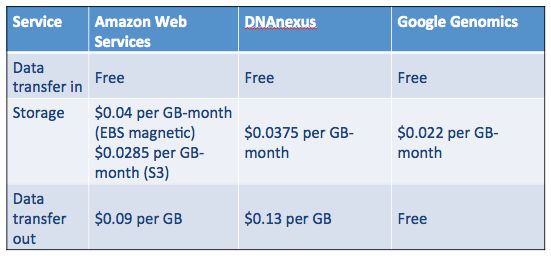
In addition to my original “roll your own” approach, DNAnexus and Google Genomics have emerged as major players for end-to-end genomics workflow. In the table below, you can see that storage costs for AWS S3, DNAnexus and Google Genomics are roughly the same. Everyone provides free uploads (we want your data!), but the cost for transferring data out of the systemvaries. Google Genomics does not charge for this, but instead charges for API access. For my current AWS storage, I pay about $4 per month to store my genome.
Table 1. Comparison of AWS, DNAnexus and Google Genomics storage costs. Your mileage may vary. Accessed July 7, 2015.
Ultimately, I selected DNAnexus over Google Genomics because their workflow API is well-developed and appealed to my roll-up-your-sleeves sensibility. (If you’re comfortable with command-line work, this platform is for you. BaseSpace, GenoSpace and Galaxy are other platforms to consider.) Google Ventures backed DNAnexus in 2011, so it’s difficult to predict what will happen in the long run. What we do know is that the value of their respective platforms will increase as more people join (and add data) to them. Google Genomics has partnerships with DNAstack, Autism Speaks and even DNAnexus. DNAnexus has partnerships with Baylor College of Medicine, WuXi NextCODE, and the Encode Project. The battle begins. If these two platforms can maintain standards-based interoperability, the competition is good for everyone.
Astronomical becomes Genomical: A Perspective on Storage
In this recent article about big data and genomics, the authors compare the field of genomics with three other Big Data applications: astronomy, YouTube and Twitter. In common with genomics, these domains: 1) generate large amounts of data, and 2) share similar data life cycles. The authors examine four areas–acquisition, storage, distribution, analysis–and conclude that genomics is “on par with or the most demanding” of these disciplines/applications. My previous experience in medical imaging (a field that arguably tackled the prior generation of “big data” issues) leads me to believe that genomics will come to epitomize Big Data to many more people before long.
If you look carefully at the projections in the figure above, we may run out of genomes to sequence (really?), which brings us back to storage. Where will we store all of this sequence data, especially as genomic medicine continues its inexorable move to the clinic?
Delete Nothing and Carry on
If the field of medical imaging is an indicator, deleting anything after it has been archived is the exception rather than the rule. The main reason for this is medicolegal — hospitals avoid the liability of not being able to recall an exam later by keeping everything. Although the incidence of requiring access to images after diagnosis is low, the consequence of not having access to the original diagnostic image is high. A former colleague suggested that about 5% of their medical archive customers use lifecycle management features to delete imaging exams. In medical imaging, customers more commonly use lifecycle management features to migrate images to less expensive storage devices over time. So, in genomics, you might migrate your sequence data stored on Amazon from solid state storage (most expensive) to S3 to Glacier (least expensive). But my best guess: we’ll delete nothing and carry on.
In March 2014, my wife and I “got genomed” by enrolling in Illumina’s (now Genome Medical’s) Understand Your Genome (UYG) program. UYG requires participants to order this whole genome sequence (WGS) test from their physicians due to uncertainties surrounding the delivery of genomic results in the U.S. Illumina is careful to point out that the service “…has not been cleared or approved by the U.S. Food and Drug Administration” and “you will not receive medical results, or a diagnosis, or a recommendation for treatment.” Our family physician signed the request in November 2013, and we received our results in February. Fortunately, no surprises, but the UYG program only covers these Mendelian disorders for now. We flew to San Diego a few weeks later to listen to talks by genomic researchers and discuss our results with genetic counselors. As part of this one-day seminar, we each received an iPad Mini that was pre-loaded with our results, as well as a portable hard drive that contained our raw sequence data.
I received my WGS data on this encrypted hard drive (about 100GB).
After we arrived home, the next step was to find a public “home” for my sequence data (to share without restrictions). What I learned is that uploading your genome anywhere is a challenge, mostly because the dataset is so big.
My genome data and results are now in the public domain, freely available to download under a Creative Commons (CC0) license. Uploading the data took two days over a 3Mbps connection, so you may want to read the clinical report and sample report instead.
ftp://ftp.startcodon.org <– I decommissioned the ftp server


 I got genomed by Illumina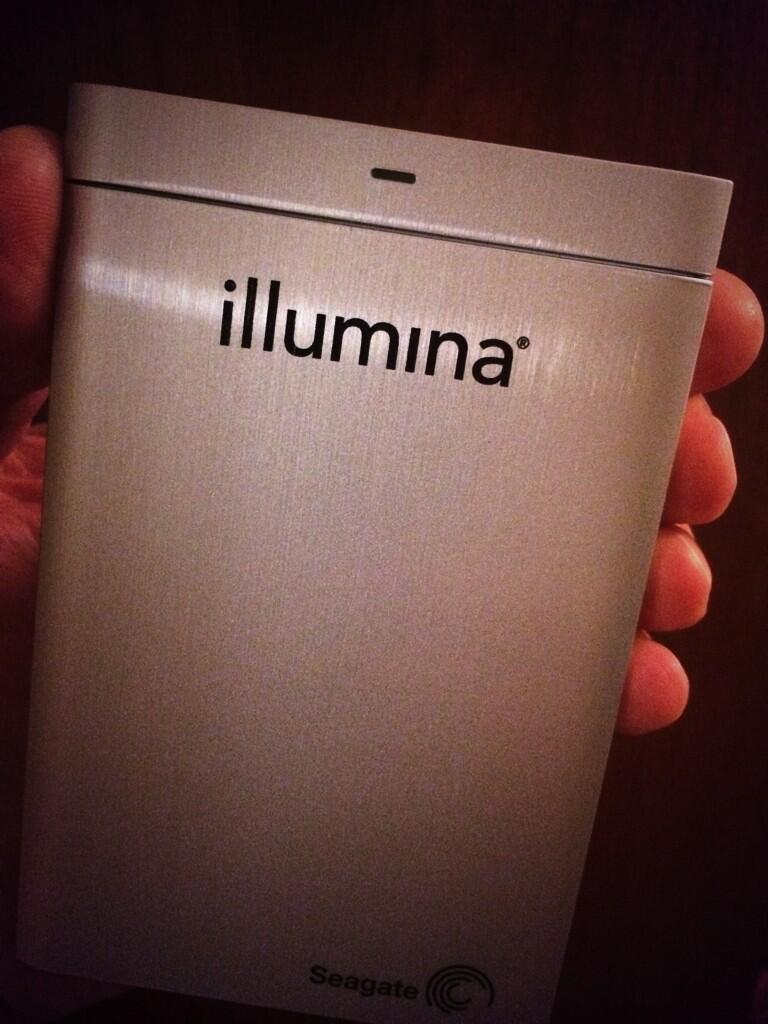
 GenomeDad Blog